It seems my ISP Time has discontinued it’s Time Voice App for some time hence it’s public network routable SIP IP Address is no longer working since December 2025. The only option is by using ISP provided ONU router which consists of 1 POTS. The VOIP is on separate VLAN and is not public routable. I did attempt to do VLAN tagging like how I did for Unifi, but it does not work for Time. I guess Time has it’s own ACL in place. Since then, I was researching on platform that allow me to subscribe for Malaysia DID and Twilio is one of them.
Managed to setup VOIP on Time via VLAN. Guide is available.
Earlier this year, I topped up my Twilio account with USD 20 to upgrade my account from trial account and bought a Malaysian DID USD 4.99 per month. I will be trying out for a few months to see how it goes, if it worth renewing later by topping up my account again. Here’s the catch, the DID doesn’t comes with unlimited minutes although you forwarded to VOIP/SIP. I might consider looking for alternatives like Call Centric which slightly higher monthly fees but with unlimited incoming minutes.
I took quite some hassle trying to get it set up in my existing FreePBX. That includes trial and error on router configurations, reinstalling FreePBX and trying out different FREEPBX alternatives. This is the summary on how Elastic SIP Trunk should be set up in FreePBX.
Pre-Requisites
- You need to have a Public IP for your internet connection. Ideally a static IP Address
- Perform port forwarding DST NAT on port 5060 to your FreePBX host.
- Perform port forwarding DST NAT on port 10000 - 20000 to your FreePBX host.
- Opening Up firewall for RTP ports (10000-20000)
- You need to disable fast track connection
- Disable SIP ALG in your router
Configuration at FreePBX end
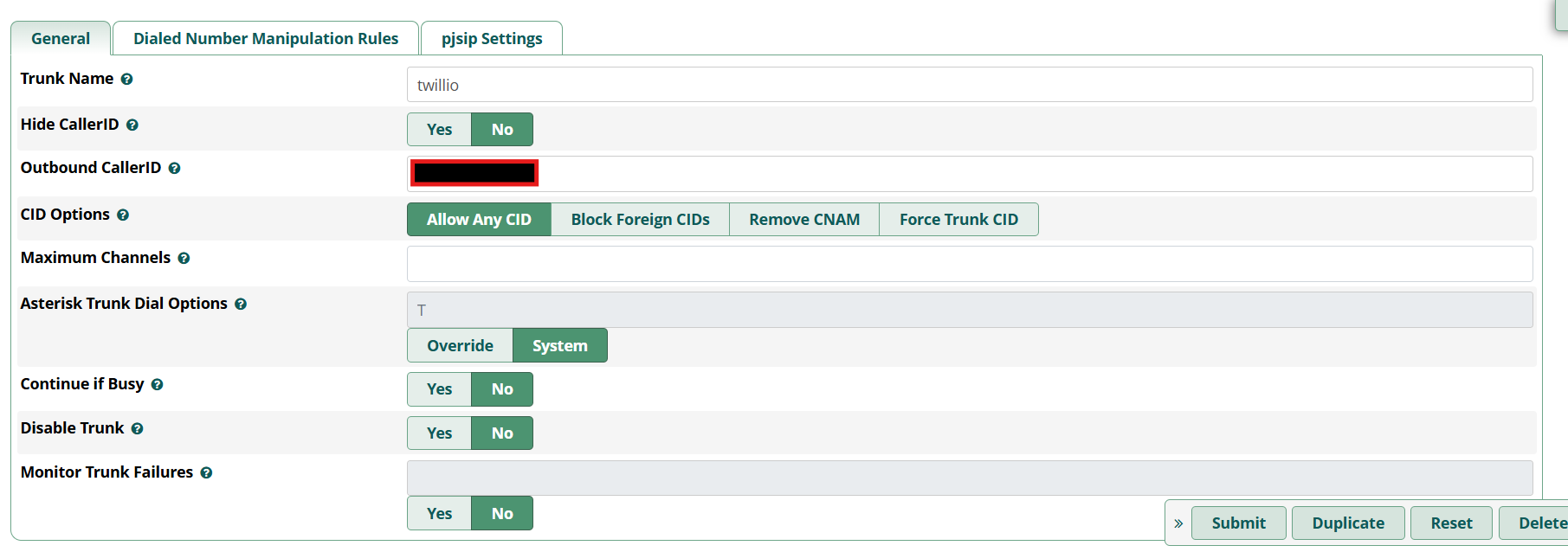
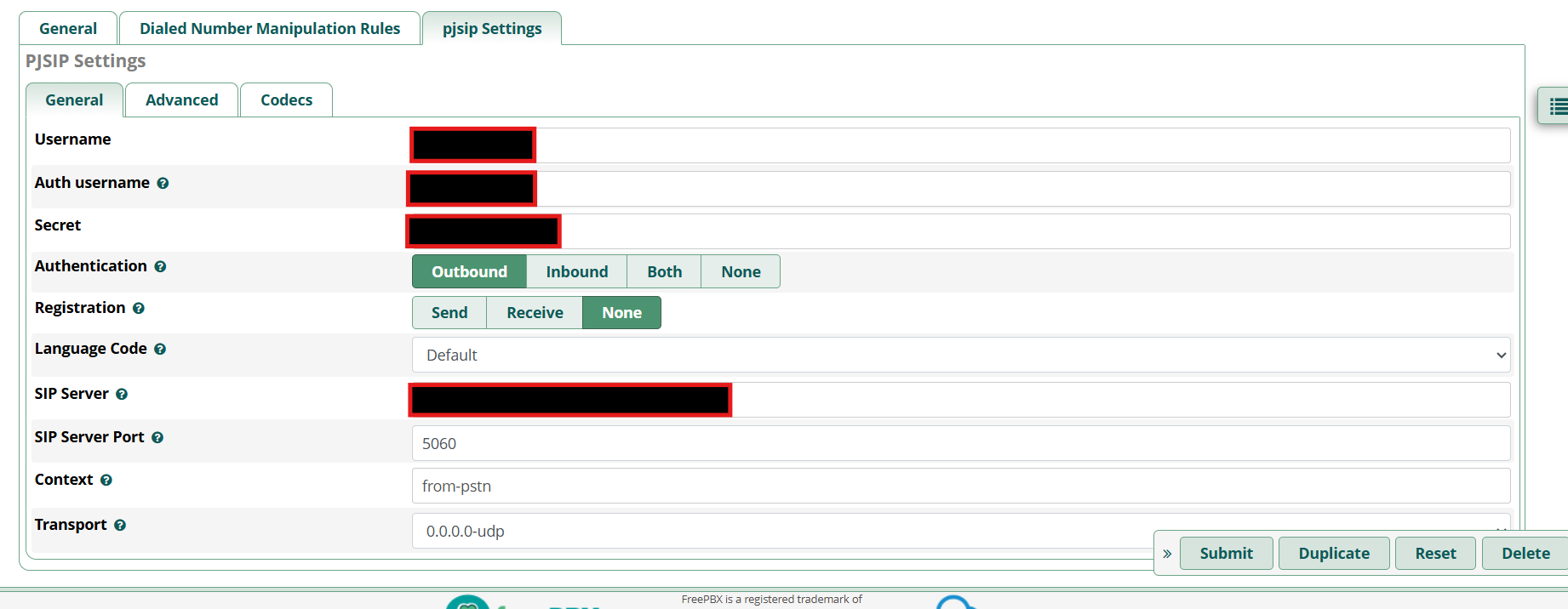
Username / Auth username : The username and password you configured in your Credential list
SIP server: Your termination SIP URI which you have created when configure Elastic SIP trunk in Twilio
Under Advance Tab: Only configure DTMF Mode to RFC4733
For outbound calls to work, you will need a specific outbound route. Ensure you add prefix “+” on each of your dial plan like example below
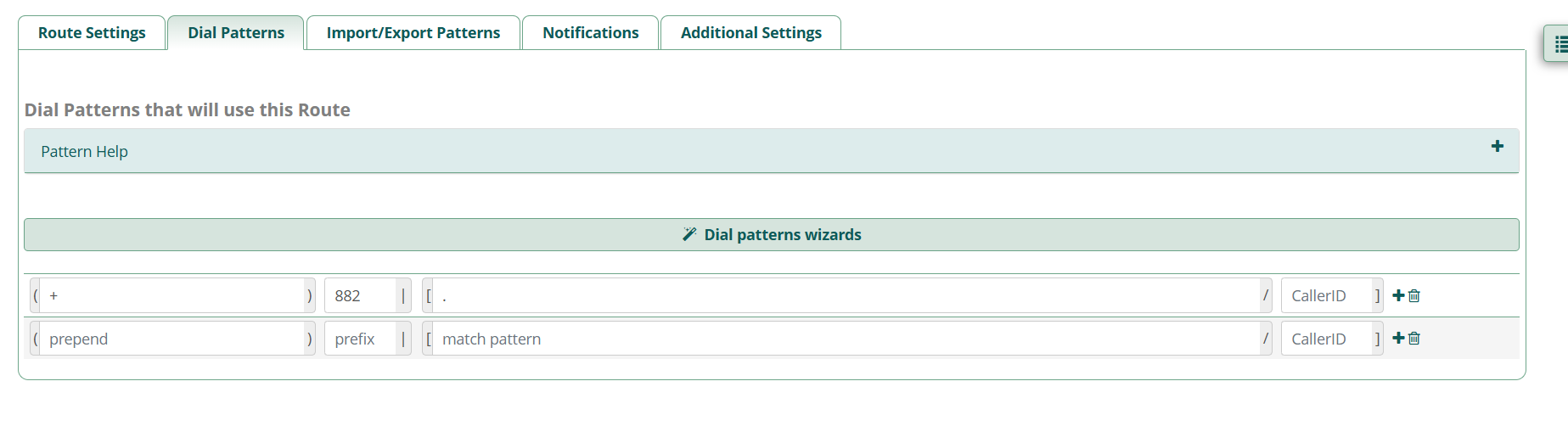
In the above example, you need to dial 88260380008000 if you wish to call +60380008000
At Twilio End
DO REMMEBER TO CONFIGURE THE BELOW
- Disable Secure Trunking (At least for now, until you got the initial trunk up and running)
- Enable Symmetric RTP
- Setup Termination SIP URI. Under Authentication, ensure you whitelisted your static public IP under IP Access Control Lists and attached Credential Lists. You can create one on the spot if you have none ready.
- Under Origination, add your static public IP or FQDN as Origination URI. Make sure to begin with “sip:” without the quotations.
I trust this guide is helpful and more straightforward than any guide out there.